Skip to content
Your call list.Go.
Import your CSV and work through calls one after another—without copying numbers, juggling tabs, or buying another bloated sales platform.
Chrome extension
Works with Quo
14-day free trial
Live workflow
01 Open Quo’s dialer Zavrenn prepares the next call without tab juggling.
02 Talk in Quo Focus on the conversation while Zavrenn holds your place.
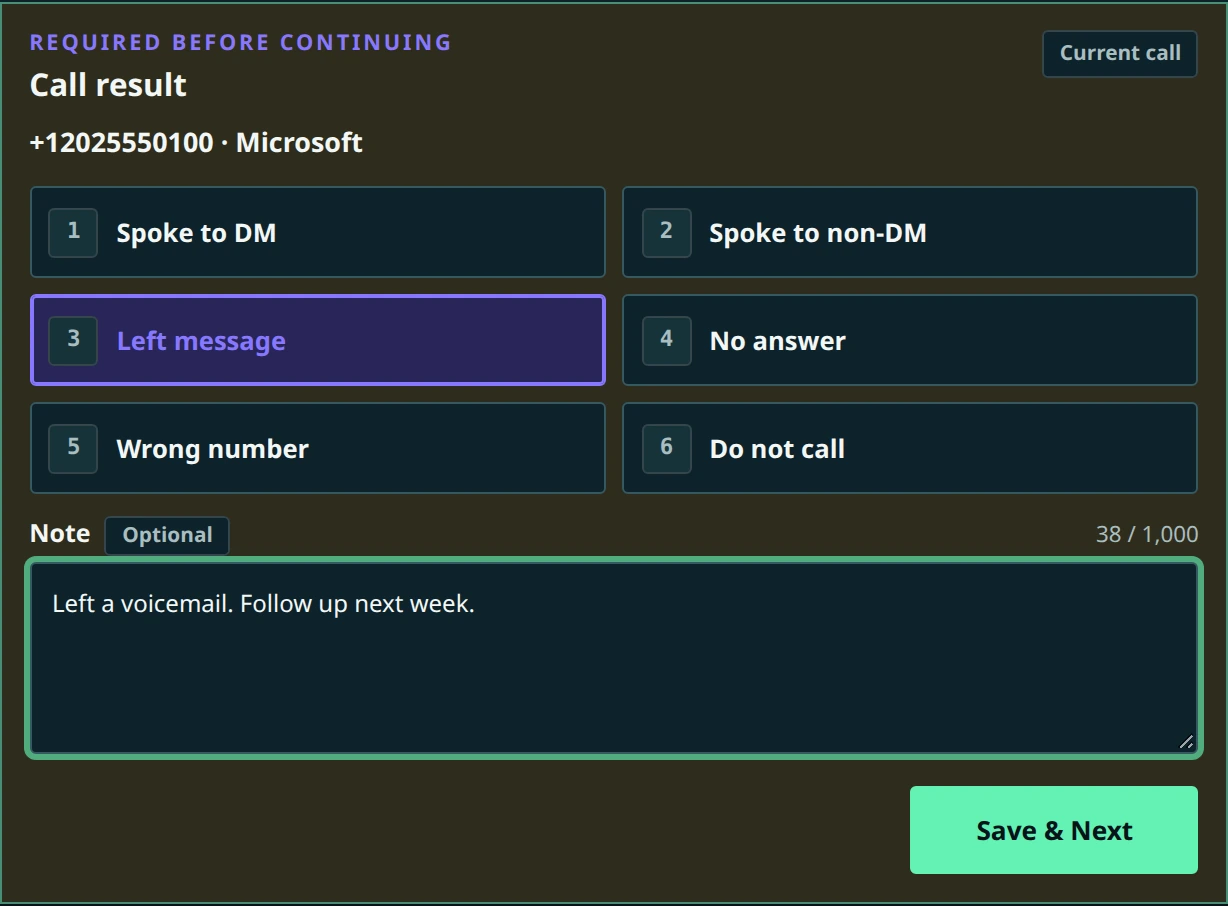
03 Capture the outcome Save the result and move cleanly to the next contact.
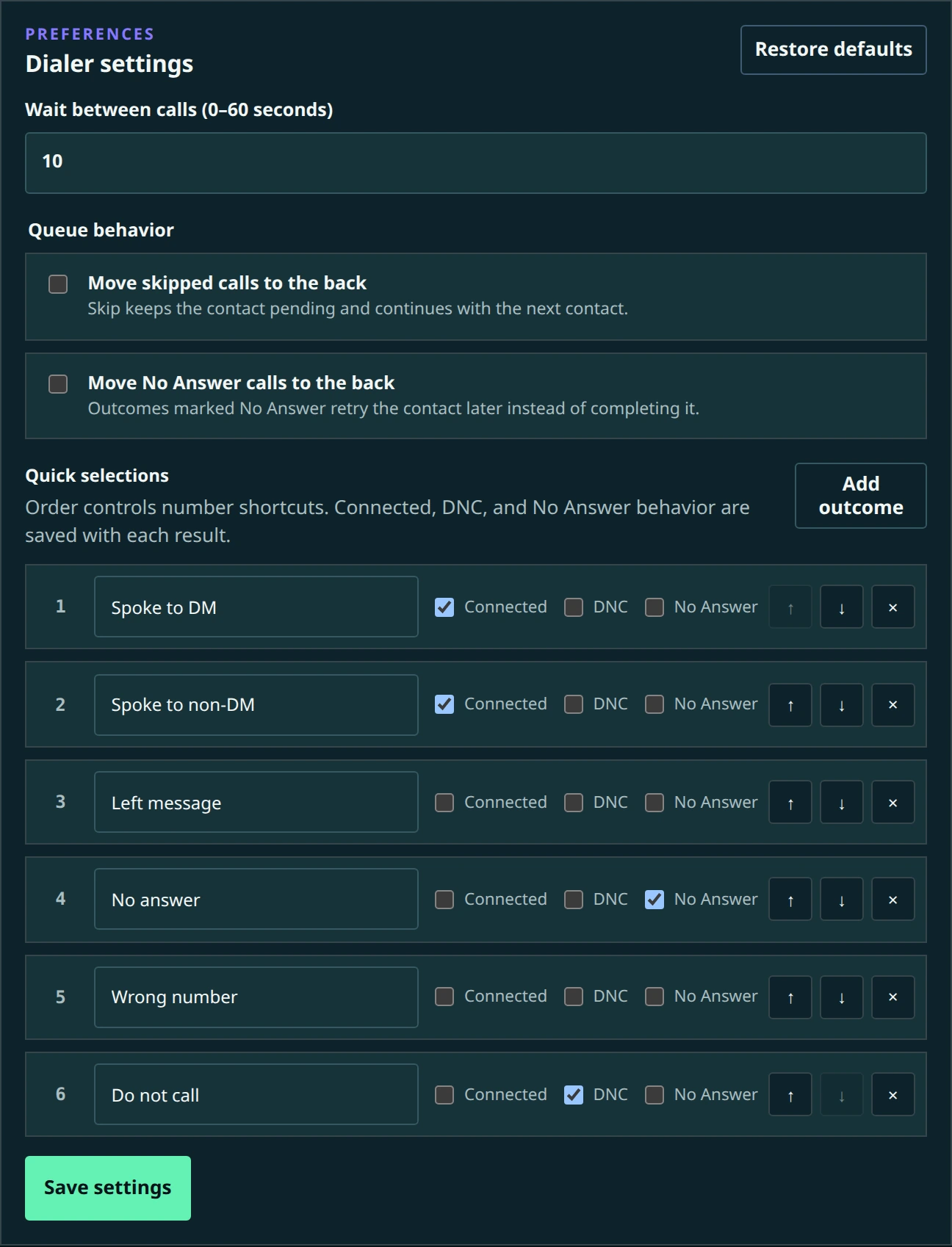
04 Tune your workflow Customize outcomes, connections, DNC behavior, and pacing.
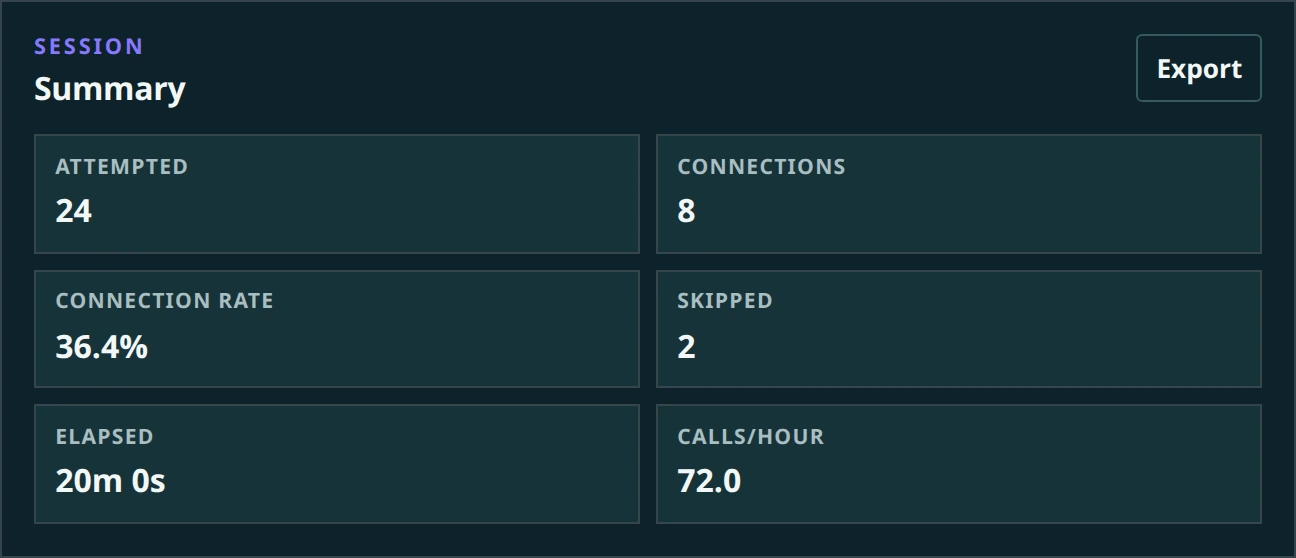
05 Review the session See throughput at a glance and export the finished log.
Open → Talk → Outcome → Review → Export
Calling shouldn’t involve this much clicking
Stop copy. Paste. Dial. Repeat.
Calling through Quo works great—until you have a hundred numbers to get through. Zavrenn handles the repetitive steps so you can focus on the conversation.
× Without Zavrenn
Find contact → Copy number → Open Quo → Paste → Dial → Update sheet → Repeat
Seven little interruptions, repeated all day.
✓ With Zavrenn
Import CSV → Start dialing → Talk → Choose outcome → Next
Your list keeps moving. Your attention stays on the call.
Everything you need. Nothing you don’t.
No new CRM.
You already have Quo. You already have a list. Zavrenn gives you the small, focused layer that connects the two.
01 Import any call list Upload your CSV and turn it into a clean calling queue in a few clicks.
02 One call after another Finish a call, record what happened, and Zavrenn gets the next contact ready.
03 Notes and outcomes built in Connected, voicemail, no answer, follow up, DNC—or customize outcomes for your workflow.
04 Never lose your progress Pause, close Chrome, and come back later. Your queue and results stay put.
05 Remember DNCs automatically Mark a number Do Not Call once and Zavrenn keeps it out of future imported lists.
06 Export when you’re done Download your call results and put them wherever you actually keep your leads.
✓
Your leads stay yours
Useful software doesn’t need your database.
Zavrenn doesn’t upload your contacts to another CRM or sales platform. Your lists, notes, outcomes, and call history stay locally in your browser.
No lead syncing
No telemetry
No AI training on your data
Simple tool. Simple price.
Less than the cost of losing one good conversation.
Start with the complete extension free for 14 days. After that, it’s $14.99 per month. Cancel anytime.
14-day free trial
$ 14.99 / month
Free for your first 14 days
Then $14.99 per month. Cancel anytime.
Everything in Zavrenn
All future beta updates
Cancel anytime
Get started
Straight answers
Before you start calling.
Does Zavrenn replace Quo? No. Zavrenn works alongside Quo in Chrome. Quo remains your calling platform.
Do I need another CRM? No. Import a CSV, make your calls, and export the results back to wherever you keep your leads.
Does Zavrenn upload or store my leads? Your calling data stays locally in your browser. Zavrenn does not sync it to a remote service.
Can I customize call outcomes? Yes. Rename and reorder outcomes, choose which ones count as connections, and decide which one remembers a number as Do Not Call.
Is Zavrenn affiliated with Quo? No. Zavrenn is an independent product and is not affiliated with or endorsed by Quo or OpenPhone.
You’ve already got the list.
Start calling it. No new CRM. No bloated sales platform. Just get through your list.
Get started →
We use cookies
We use essential cookies to remember your choice and optional tracking to understand website usage and personalize advertising. Privacy Notice
Reject optional Accept all
JavaScript is disabled. Optional tracking scripts cannot run. Enable JavaScript to save cookie choices.
Cookie settings ×
Choose which optional tools may run on this website. You can change or withdraw your choice anytime using Cookie settings in the footer. These choices do not change the extension’s local calling data.
Essential Security, core site functions, and your consent preference. Always active.
Always on Analytics Google Analytics and Cloudflare visit and performance measurement.
Session replay Microsoft Clarity heatmaps and recordings of website clicks, scrolling, and interactions.
Advertising Google Ads measurement and personalization, plus advertising storage for Clarity if session replay is enabled.
Your browser’s Global Privacy Control signal keeps optional tracking off.
Your choice is stored on this browser for up to 180 days. Saving reloads this page to apply tracking restrictions. Read the Privacy Notice .
Reject optional Accept all Save choices